


Five creative tools, one comprehensive digital art studio designed for little hands and big imaginations
Picture a 4-year-old discovering DJ mixing for the first time, layering fire truck sirens over construction vehicle beeps to create what they proudly call "rescue music." As their dancing mascot bounces to the beat, their face lights up with pure creative joy. This is the kind of experience Create & Play is designed to deliver—turning natural vehicle fascination into comprehensive creative learning.
Create & Play isn't just another art app—it's a comprehensive digital creativity studio designed specifically for toddlers and preschoolers who love vehicles. With five distinct creative tools housed in one interactive playroom, it offers the kind of open-ended, mess-free creativity that busy families crave while supporting genuine artistic and musical development.
What is Create & Play?
It's a toddler-friendly digital art studio with five creative tools—coloring, sticker scenes, DJ mixing, piano, and collectible cards—designed around vehicles, ad‑free, and works offline.
Prefer to start with healthy screen-time basics? Read our Screen Time Guidelines for Educational Apps.
Perfect for Quiet Time and Independent Play
When your toddler drops their nap but still needs downtime, Create & Play shines as a quiet time solution:
- Calm, focused engagement: No fast-paced games or overstimulating visuals
- Truly independent: Even 2-year-olds can navigate without constant parent help
- Volume control: Silent mode or gentle background music—perfect for afternoon quiet time
- Extended engagement: Five different activities mean 30-45 minutes of peaceful creativity
- Works offline: No WiFi needed once downloaded, perfect for travel or areas with limited connectivity
Parents consistently report Create & Play as their go-to for restaurant wait times, long car rides, and that crucial 3pm wind-down period. Compare it to other options in our guide: Best Toddler Art Apps (Quiet Time + Travel Ready).
The Create Playroom: Your Child's Digital Art Studio
Designed for Independent Exploration
The moment children open Create & Play, they're welcomed into an interactive desk environment that feels like a real art studio. Unlike apps with overwhelming menus or text-heavy interfaces, the Playroom Hub uses visual discovery to guide exploration.
Intuitive Navigation Features
- • Tappable toys that glow and wiggle when ready for interaction
- • Swipeable room design that encourages exploration
- • Hidden easter eggs like light switches and interactive mascot
- • No text menus—everything is visual and toddler-accessible
Why This Matters for Development: The hub design mirrors how children naturally explore physical spaces, supporting spatial reasoning and cause-and-effect learning while building confidence in digital navigation.
Feature Deep-Dive: Five Creative Tools in One App
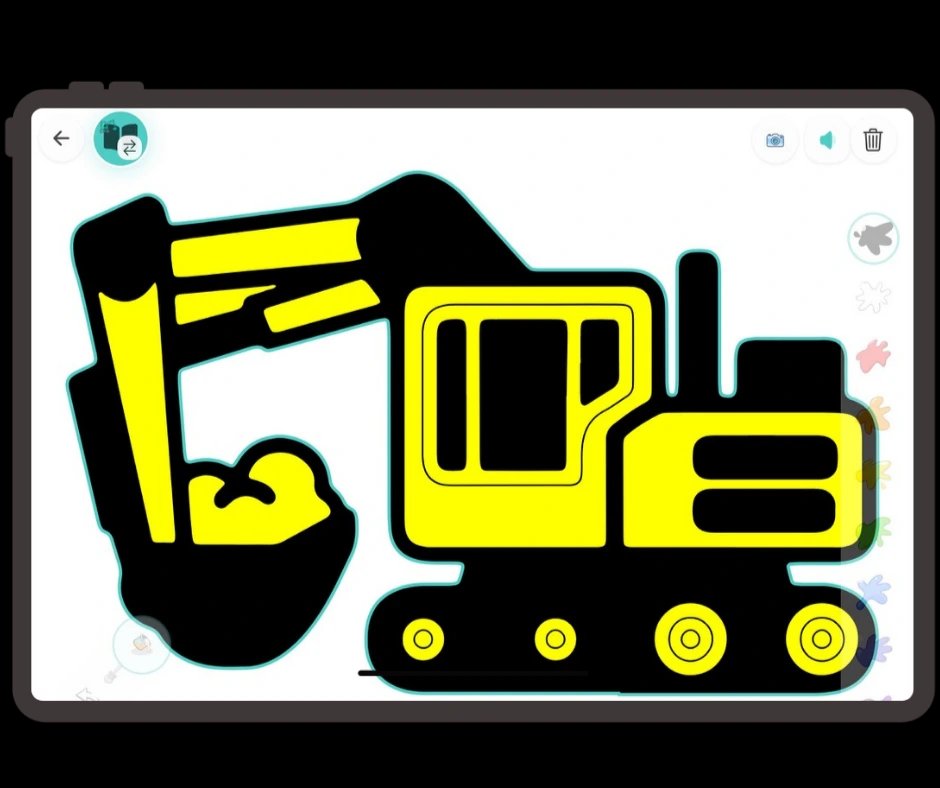
Advanced coloring tools with vehicle designs and color learning
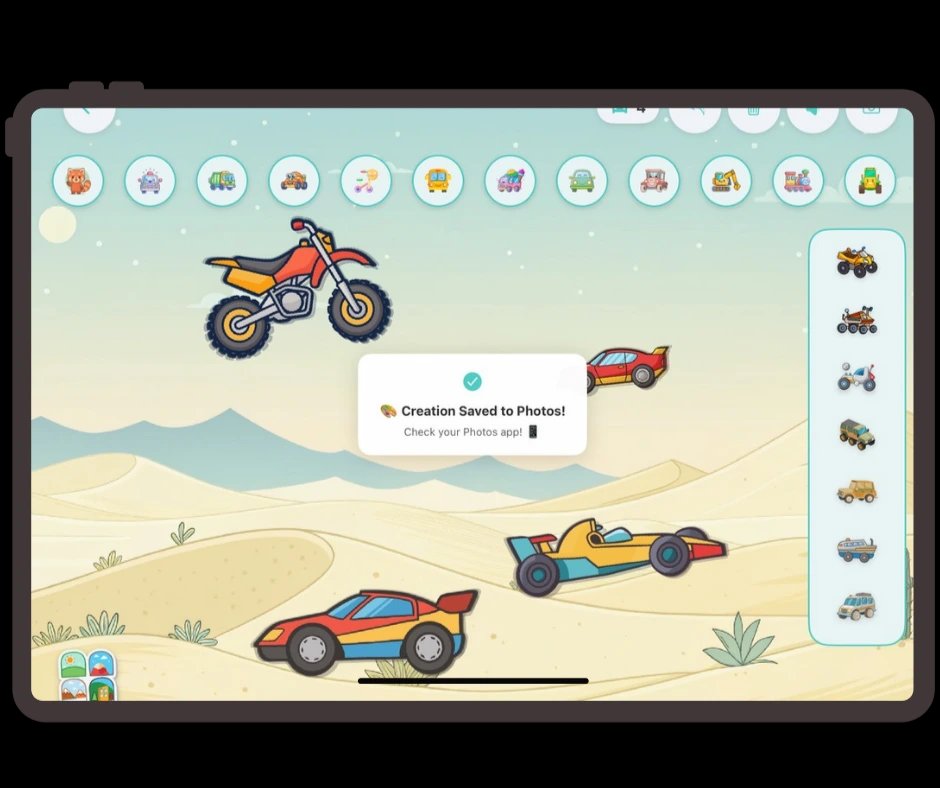
Physics-enabled sticker scenes for storytelling and creativity
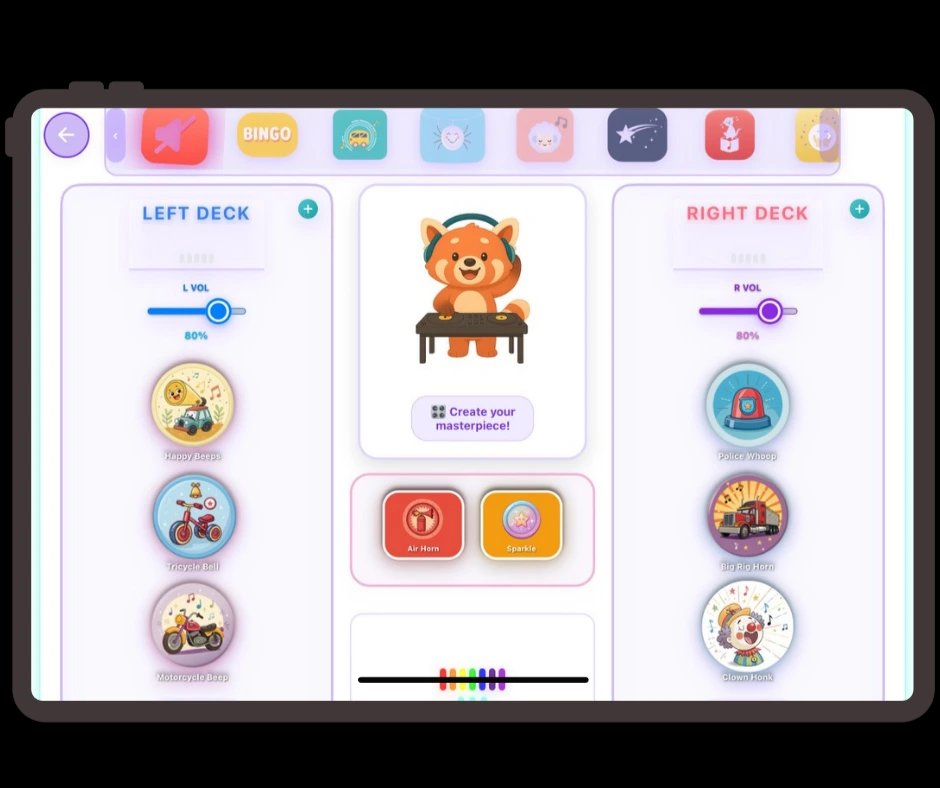
Professional DJ mixing with vehicle sounds and music creation
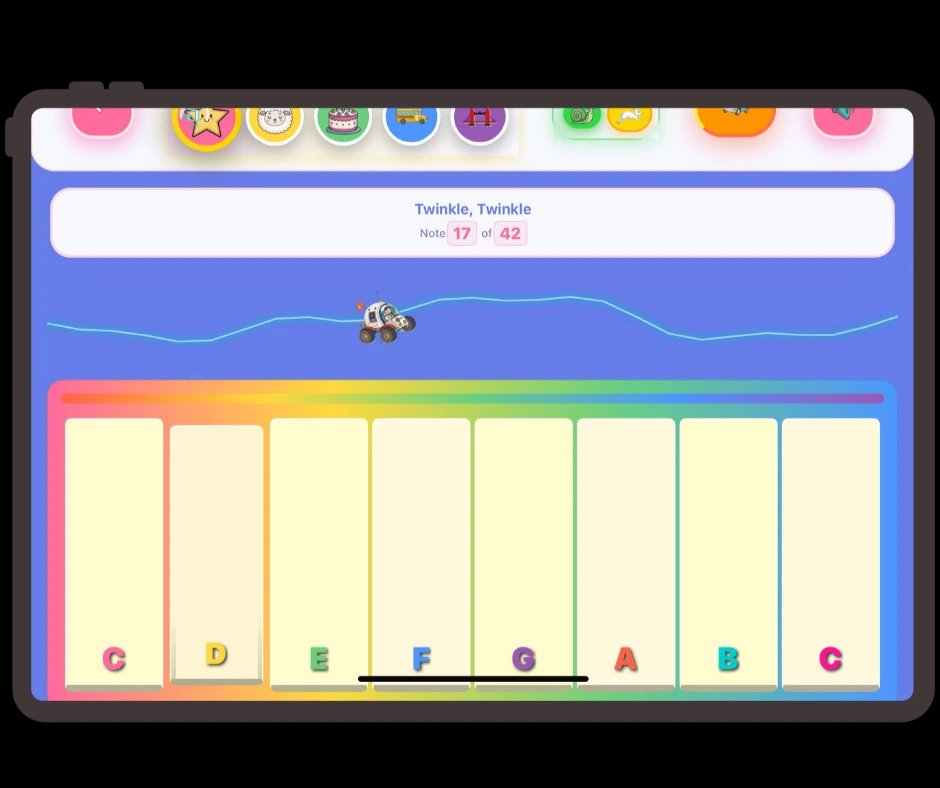
Interactive piano with classic songs and musical exploration
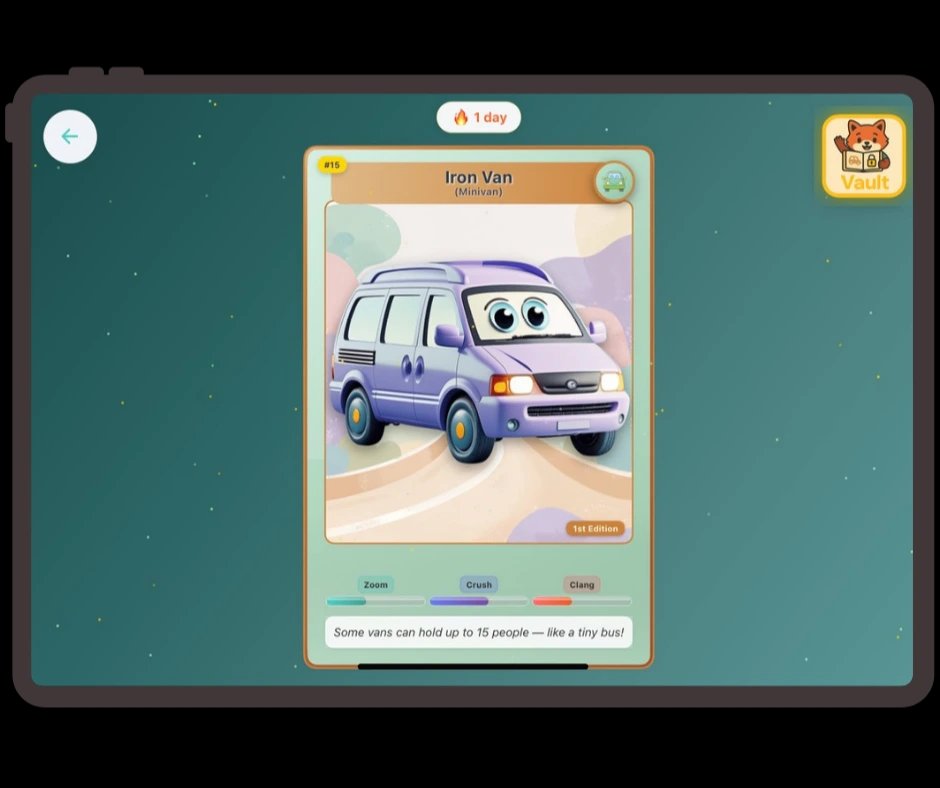
Educational vehicle facts through collectible cards and gentle gamification
1. Pit-Stop Paint: Beyond Basic Coloring
Most coloring apps offer simple fill-bucket tools and basic designs. Pit-Stop Paint elevates the experience with professional-grade features designed for developing artists.
Advanced Coloring Capabilities
- Tap-Fill Mode: Perfect for younger toddlers learning color recognition
- Free-Draw Mode: Unrestricted creative expression with various brush sizes
- Hybrid Mode: Combines structured coloring with creative freedom
Educational Integration
- Color Learning: Systematic introduction to color theory through rainbow progression
- Audio Feedback: "Blue!" confirmation helps connect visual and auditory learning
- Vehicle Variety: Multiple designs from fire trucks to submarines, each with unique coloring opportunities
Typical Development Pattern: Many toddlers progress from exploratory scribbling to more controlled coloring as they engage with structured yet forgiving digital art tools. The undo feature encourages experimentation, while themed content often sustains engagement longer than generic designs.
2. Vroom Room: Storytelling Through Scenes
Traditional sticker apps place static images on backgrounds. Vroom Room transforms stickers into dynamic storytelling tools with physics-enabled interaction.
Advanced Sticker Physics
- Scaling and Rotation: Children can resize and position vehicles precisely
- Collision Detection: Vehicles interact realistically when they touch
- Chaos Mode: Bouncy physics create delightful cause-and-effect experiences
- Scene Variety: Multiple backgrounds from farms to beaches to construction sites
Narrative Building Features
The app is designed to encourage storytelling through vehicle arrangements:
- Emergency Scenarios: Rescue vehicle groupings inspire heroic storylines
- Construction Scenes: Work vehicle combinations encourage building-themed narratives
- Transportation Networks: Creating roads and travel routes with various vehicles
Free Coloring Pages
Get free vehicle coloring pages for screen-free creative time. No markers, no mess—just print and play.
Get free printables →Extensive Vehicle Library
The vehicle collection ensures children never run out of creative possibilities:
- Emergency vehicles (fire trucks, ambulances, police cars)
- Construction equipment (excavators, cement mixers, bulldozers)
- Transportation (trains, planes, boats, buses)
- Specialty vehicles (ice cream trucks, garbage trucks, mail trucks)
3. DJ Van Beats: Music Creation for Young Artists
This is where Create & Play truly differentiates itself from other creativity apps. DJ Van Beats isn't just about playing sounds—it's a complete music creation environment designed for developing musicians.
Professional DJ Features Adapted for Toddlers
- Dual Deck System: Like real DJ equipment but simplified for small hands
- Loop Functionality: Children can create repeating patterns and layer sounds
- Sound Effects: Professional mixing tools adapted for vehicle sounds
- Piano Modes: Both traditional piano and vehicle-themed sound keyboards
Vehicle Sound Library & Classic Nursery Rhymes
DJ Van Beats combines authentic vehicle sounds with familiar melodies:
Vehicle Sounds
- Engine rumbles from different vehicle types
- Sirens and horns with varying pitches
- Construction equipment beeps and hydraulics
- Transportation sounds like train whistles and boat horns
17 Original Nursery Rhyme Remakes
- Old MacDonald Had a Farm
- Happy Birthday
- Hickory Dickory Dock
- Bingo
- Mary Had a Little Lamb
- Row, Row, Row Your Boat
- ...and 11 more beloved classics
These original remakes allow children to mix familiar melodies with vehicle sounds, creating unique musical experiences that bridge traditional songs with modern creativity.
Creative Expression Example: Children often create themed musical compositions like "rescue symphonies" by mixing vehicle sounds, naturally learning rhythm, cause and effect, and musical expression. This combines music education with creative play in ways that feel natural to developing minds.
Musical Development Benefits
- Rhythm and Timing: Creating beats develops musical timing
- Pattern Recognition: Looping sounds teaches musical structure
- Creative Expression: Open-ended music creation supports emotional development
- Auditory Processing: Distinguishing and layering different sounds
4. Piano Playground: Musical Discovery Made Simple
While many music apps overwhelm toddlers with complex interfaces, Piano Playground offers an intuitive musical experience designed specifically for developing hands and minds.
Interactive Musical Features
- Classic Children's Songs: Five beloved melodies including "Twinkle Twinkle" and "The Wheels on the Bus"
- Autoplay Mode: Visual key highlighting helps children follow along and learn
- Free Play Mode: Open exploration with immediate audio feedback
- Speed Control: Normal and slow playback for learning at your child's pace
Educational Music Benefits
- Note Recognition: Large, clear letter labels on each key support early literacy
- Rhythm Development: Following along with songs builds musical timing
- Memory Skills: Song repetition strengthens musical memory and pattern recognition
- Fine Motor Control: Precise tapping develops finger coordination and dexterity
Musical Development Example: Children often start by randomly tapping keys, then begin following the visual cues during autoplay, and eventually attempt to recreate melodies independently—a natural progression from exploration to mastery.
5. Daily Card Pull: Gamification Done Right
Many apps use artificial rewards that create external motivation dependence. Daily Card Pull provides gentle achievement recognition while teaching vehicle knowledge.
Collectible System Features
- Daily Quizzes: Age-appropriate questions about vehicles and their functions
- Celebration Elements: Visual and audio feedback for achievements
- Vehicle Facts: Each card teaches something new about vehicle functions
- Skills Information: Cards highlight what each vehicle does and why it matters
Educational Value
- Memory Skills: Recalling information to answer daily questions
- Vocabulary Development: Learning vehicle names, functions, and characteristics
- Classification Skills: Understanding how different vehicles serve different purposes
- Patience and Anticipation: Learning to wait for daily rewards
6. Understanding the Creative Tool Differences
Parents often wonder about the distinction between the creative features:
Pit-Stop Paint
- • Structured creativity within vehicle outlines
- • Color theory and recognition learning
- • Fine motor skill development
- • Completion-oriented activities
- • Professional-grade brush tools and textures
- • Bucket fill and gradient options
- • Undo/redo functionality for confidence building
- • Save and share finished artwork
Vroom Room
- • Open-ended spatial creativity
- • Storytelling and narrative development
- • Physics and cause-effect exploration
- • Process-oriented play
- • Realistic physics simulation for stickers
- • Multiple scene backgrounds and environments
- • Drag-and-drop interaction with gravity effects
- • Endless creative combinations and scenarios
DJ Van Beats
- • Professional music mixing concepts
- • Rhythm and pattern recognition
- • Auditory processing development
- • Creative sound exploration
- • 17 original nursery rhyme remakes to mix
- • Familiar melodies combined with vehicle sounds
Piano Playground
- • Traditional musical learning
- • Note recognition and melody
- • Follow-along skill building
- • Classic song familiarity
Daily Card Pull
- • Educational fact learning
- • Memory and recall practice
- • Gentle achievement system
- • Knowledge-building focus
Why All Five Matter: Different children gravitate toward different creative approaches. Some love the satisfaction of completing detailed coloring pages, others prefer open-ended storytelling through scene building, while musical children may connect most with Piano Playground or DJ Van Beats. Having diverse creative options supports different learning styles and interests.
The Science Behind Vehicle-Based Creativity
Transportation Schema and Learning
Research on schemas suggests that children's natural fascinations (like vehicles) can create favorable learning conditions. When creativity tools align with existing interests:
- Engagement Often Increases: Children may spend longer in creative activities when content matches their interests
- Skill Transfer May Improve: Learning within passionate interests can transfer to other areas
- Intrinsic Motivation Can Strengthen: Children may develop stronger internal drive for creative expression
Multi-Modal Learning Benefits
Create & Play engages multiple learning channels simultaneously:
- Visual Processing: Colors, shapes, spatial relationships, pattern recognition
- Auditory Development: Sound discrimination, rhythm, musical timing, audio-visual connection
- Motor Skills: Fine motor control, hand-eye coordination, spatial manipulation
- Cognitive Growth: Problem-solving, planning, memory, categorization skills
Age-Appropriate Progression: Growing with Your Child
2-3 Years: Discovery and Exploration
- • Simple tap-fill coloring in Pit-Stop Paint
- • Basic sticker placement in Vroom Room
- • Sound exploration in DJ Van Beats
- • Key tapping and song listening in Piano Playground
- • Daily card collection with minimal quiz complexity
3-4 Years: Skill Building and Creation
- • Free-draw mode integration in coloring
- • Story creation with sticker scenes
- • Beat pattern creation and looping
- • Following along with autoplay piano songs
- • More complex daily quiz questions
4-5 Years: Advanced Creativity and Mastery
- • Detailed artwork combining multiple creative tools
- • Complex scene narratives with physics exploration
- • Multi-layered music composition and mixing
- • Independent piano melody recreation
- • Teaching younger siblings or friends
Comparing Create & Play to Alternatives
vs. Traditional Art Apps
Typical Art Apps
- • Single function (coloring OR drawing OR stickers)
- • Generic themes that may not capture sustained interest
- • Basic tools without advanced features
- • Limited educational integration
- • No progression system or skill development
- • Separate apps required for different activities
Create & Play Advantages
- • Five distinct creative tools in one comprehensive app
- • Vehicle theme that taps into natural toddler interests
- • Professional-grade features adapted for developing skills
- • Educational elements woven throughout all activities
- • Age-appropriate progression system that grows with child
- • Seamless integration between all creative modes
- • Offline functionality with no ads or subscriptions
vs. Multiple Single-Purpose Apps
Many families download separate apps for coloring, stickers, music, and games, leading to:
- Device storage issues
- Inconsistent interfaces confusing for toddlers and preschoolers
- Subscription costs across multiple apps
- Fragmented creative experiences
Create & Play's Integrated Solution:
- One app purchase covers all creative needs
- Consistent, toddler-friendly interface across all tools
- Seamless movement between different types of creativity
- Comprehensive development support in unified experience
Common Development Patterns
The Reluctant Artist
Children who initially show little interest in art often discover their creative side through themed content that matches their interests. Vehicle-focused coloring can serve as a gateway to broader artistic exploration and confidence building.
The Future Musician
Toddlers with strong interests in specific vehicles often use those fascinations as entry points into music creation. This natural bridge between interests and musical exploration can spark broader musical curiosity.
The Storyteller
Scene-building activities often encourage narrative development and vocabulary expansion as children create stories around their visual compositions. This supports both creative and language development.
Technical Excellence: Behind the Scenes
Offline Functionality
Create & Play works completely offline, ensuring:
- Uninterrupted creativity during travel
- No internet dependency for core features
- Privacy protection without data transmission
- Consistent performance regardless of connection
Child-Friendly Design
- Large, easily tappable interface elements
- Forgiving touch recognition for developing motor skills
- Clear visual feedback for all interactions
- Intuitive navigation without text dependence
Supporting Your Child's Creative Journey
Maximizing App Benefits
Engage Without Directing
- Ask open-ended questions about creations
- Listen to their stories about artwork and music
- Avoid suggesting "better" ways to create
- Celebrate process over product
Connect to Physical World
- Use app experiences to inspire real-world activities
- Point out vehicles during outings that appear in the app
- Encourage physical art projects inspired by digital creations
- Discuss community helpers and transportation in daily life
Troubleshooting Common Challenges
"My Child Only Uses One Feature"
This is completely normal and beneficial! Children naturally discover and use more features as they grow—Create & Play is built for developmental progression. Deep exploration of preferred activities builds mastery and confidence, creating a foundation for branching out when they're developmentally ready. The app's integrated design means skills from one tool naturally transfer to others.
"The Music Features Seem Too Complex"
From button mashing to building legitimate mixes—both DJ Van Beats and Piano Playground are designed to be delightful at every skill level. Start with simple sound exploration and let your child discover features naturally. The beauty lies in how complexity becomes approachable through gradual discovery, with each interaction designed to feel rewarding whether they're exploring sounds or creating structured compositions.
"My Child Gets Frustrated with Advanced Features"
Each tool offers multiple complexity levels with thoughtful toddler-focused design elements: large touch targets, immediate visual feedback, gentle animations, and no punitive failure states. The interface adapts to natural toddler interaction patterns—encouraging exploration of simpler modes while keeping advanced features discoverable but not overwhelming. Frustration often decreases as children develop the motor skills and cognitive understanding that advanced features require.
The Bottom Line for Creative Families
Create & Play represents a new generation of creativity apps that respect toddler and preschooler development while providing genuinely engaging, educational experiences. By combining mess-free convenience with comprehensive creative tools, it offers busy families a way to nurture artistic and musical development without sacrificing quality or depth.
The integration of five distinct creative tools around vehicle themes creates opportunities for sustained engagement and skill development that single-purpose apps simply can't match. When your child can color a fire truck, build rescue scenes with it, create emergency soundtracks, and learn about real firefighters—all within one cohesive experience—creativity becomes truly comprehensive.
Ready to Explore the Ultimate Digital Creativity Studio?
Create & Play is coming soon! Discover five unique creative tools designed specifically for toddlers and preschoolers who love vehicles.
Further Reading
Questions about Create & Play's features?
Email us at sean@recordcreativeco.com—we love helping families discover comprehensive creative solutions that work for real life.
You Might Also Like

Teaching Piano to Preschoolers: The Ultimate Parent's Guide
Make piano playful and age-appropriate. Learn 5-minute routines, rhythm games, and how to build musical foundations without pressure.
25+ Vehicle Art & Creative Activities (From Finger Painting to Digital)
Vehicle-themed creative activities for toddlers. Coloring, crafts, cardboard creations, and digital art. Free printables included.

Educational Apps for Toddlers That Parents Actually Love
Research-backed evaluation of educational toddler apps. Parent-tested quality indicators: ad-free design, offline functionality, sustained engagement. Evidence-based selection criteria. Updated November 2025 with developmental psychology framework.




